Co-authored by Minerva.
This blog was completely written by Minerva however it was independently validated by the author, with slight direction and edits from the author.
Building your own AI agent on a weekend is tricky but so much fun than it sounds. Here's what I actually built, what broke, and why I decided it was worth my time. Meet Minerva, my digital assistant.
Introduction: The AI App Trap
So there’s this thing everyone does. You’re on your phone. You open ChatGPT. You ask it a question. It responds. You close the app. Done.
Next time you want to talk to it, you open the app again. Same thing. Chat, get response, close. It’s useful for quick questions, sure. But it’s not integrated into your life. It’s not an agent. It’s just a chat interface you visit occasionally when you remember it exists.
Here’s what bugged me: I wanted an AI assistant that was always on, integrated into my actual workflow. Something that could:
- Watch my Obsidian vault for daily tasks
- Automatically block calendar time for high-priority stuff
- Switch between fast, cheap models (Groq) for simple tasks and smart models (Gemini) for reasoning
- All accessible from Telegram, which I already have open anyway
- Running on my own hardware, with my own data, on my own terms
And I didn’t want to pay $20/month for it. Not because I’m cheap—okay, maybe a little—but because I’m trying to optimize for cost and accuracy, not hemorrhage money every time I want a personal productivity agent that schedules my day.
Minerva’s Side Note: My master is frugal. Very frugal. He’s been on a relentless quest for free models all week. Send help. Or funding.
I was following ClawdBot, since sometime now and it was in todo since a few weeks. Finally I got enough time for this experiment. It’s not a complete solution—it’s just a messaging gateway. But once I figured out how to wire it all together with a custom Cloudflare Worker, Obsidian sync, and intelligent model routing, it actually became something I can use every day. And it costs me nothing, so far.
What is OpenClaw, Actually?
OpenClaw is a self-hosted gateway that connects messaging apps (Telegram, WhatsApp, Discord, Slack, etc.) to AI agents. You run it on your own machine, and it becomes the bridge between your chat apps and whatever backend you wire up.
Think of it as a messaging router. Instead of logging into a web interface to talk to ChatGPT, you just message your agent through Telegram. The gateway handles the plumbing, and you handle the logic.
Here’s the key difference between a chat app and an agent:
ChatGPT Mobile App: You open it, ask a question, get a response. Session ends. Next time you open it, context is gone (unless you pay for history). No tool access. No automation. It’s a utility, not infrastructure.
OpenClaw + Agent: You message it from anywhere. It remembers context across sessions. It has access to your APIs and tools. It can take actions on your behalf (like blocking calendar time). It doesn’t wait for you to ask—it can proactively help. It’s your infrastructure.
The Detour: Why I Tried (and Ditched) Ollama
I didn’t start with Gemini + Groq. I started with the obvious choice: Ollama.
As far as I know OpenClaw doesn't support Ollama natively. But you can spawn OpenClaw with Ollama. Check this
The pitch is perfect. Ollama lets you run open-source LLMs (Llama 2, Mistral, etc.) entirely on your own hardware. No API calls. No costs. No external dependencies. Just download a model and run inference locally.
In theory, this was the dream. In practice, it was a lesson in “just because you can run something locally doesn’t mean you should.”
The Reality Check
I loaded llama3.2:3b on my machine and benchmarked it:
- Latency: 2-3 seconds to start generating tokens, then another 5-10 seconds to complete
- Quality: Decent for simple tasks, but multi-step reasoning was hit-or-miss
- Reliability: Occasional crashes under load, memory leaks after running for a few days
- Infrastructure: GPU costs, electricity, cooling—none of which I was accounting for
With more context, things started slowing down. Since I’m running on a single NVIDIA GPU inside a VM on a hypervisor, GPU passthrough isn’t an option. If you have direct GPU access, expect significantly better performance. (Lucky you.)
Here’s the kicker: a task that should have taken 10 seconds—make an API call and get a response—was taking over five minutes. With everything running on the CPU, inference was painfully slow, and crashes were just icing on the cake. I was saving money on API calls, but losing it all to wasted time and frustration. Without GPU acceleration, this setup simply wasn’t usable.
The Honest Take
Ollama is excellent for learning. If you want to understand how models work, how quantization works, how to optimize inference—run Ollama. But if you don’t have a computer that can effortlessly run 8B models, relying on multiple free models for simple tasks is better. Unless you’re working with sensitive materials (medical data, proprietary code, etc.), it’s just not worth it.
My tasks are personal but there’s nothing embarrassing about them. Tasks, schedules, writing—all fine to send to Groq. So this works for me.
But here’s the thing: I’m still trying to make Ollama work. Not for primary inference—that stays with Groq and Gemini. But as a fallback for offline mode. If internet goes down, the agent can still respond using a degraded local model. It’s slower, it’s dumber, but it’s better than nothing. That’s future work though. For now, when the internet’s up, the free cloud models handle everything. Moreover its fun, so why not?
The Architecture: Obsidian → Sync → Agent → Calendar
Here’s what I actually built. And I want to be clear: this is not the only way to do this. It’s just the way that made sense for me after 10-12 hours of tinkering on a weekend.
The key insight: Obsidian is the ultimate source of truth. Whatever happens in Obsidian gets replicated to the cloud endpoint. Never the other way around. By design. This means my vault is always the real state, and everything else is just a cached view.
┌──────────────────────────────────────────────────┐
│ YOUR MACHINE (Source of Truth)                   │
├──────────────────────────────────────────────────┤
│                                                  │
│  ┌────────────────────┐                          │
│  │ Obsidian Vault     │ THE SOURCE. Everything   │
│  │                    │ starts here. Period.     │
│  └────────┬───────────┘                          │
│           │                                      │
│           │ (File watch + parse emojis)          │
│           ▼                                      │
│  ┌────────────────────┐                          │
│  │ Python Watcher     │ Detects changes,         │
│  │ Script             │ extracts emoji metadata  │
│  └────────┬───────────┘                          │
│           │                                      │
└───────────┼──────────────────────────────────────┘
            │ (HTTPS POST to Worker)
            ▼
┌──────────────────────────────────────────────────┐
│ CLOUDFLARE WORKERS (Untrusted but restricted)    │
├──────────────────────────────────────────────────┤
│                                                  │
│  ┌────────────────────┐                          │
│  │ TypeScript Worker  │ API endpoint that        │
│  │ + D1 Database      │ receives task updates    │
│  │                    │ (old tasks auto-removed) │
│  └────────┬───────────┘                          │
│           │                                      │
│           ▼ (Cached view of today's tasks)       │
└──────────────────────────────────────────────────┘
            │ (API call from agent)
            ▼
┌──────────────────────────────────────────────────┐
│ HOMELAB: DMZ VM (Isolated from your network)     │
├──────────────────────────────────────────────────┤
│                                                  │
│  ┌──────────────────────────────────────────┐   │
│  │ OpenClaw Gateway                         │   │
│  │ (Routes Telegram messages to agent)      │   │
│  └────────────┬─────────────────────────────┘   │
│               │                                  │
│               ▼                                  │
│  ┌──────────────────────────────────────────┐   │
│  │ Agent Orchestration (Pi or custom)       │   │
│  │ - Fetches today's tasks from Worker API  │   │
│  │ - Decides which model to use (or you do) │   │
│  │ - Calls Google Calendar API              │   │
│  └────────┬──┬────────┬──────────────────────┘   │
│           │  │        │                          │
│      ┌────▼─┐│        │                          │
│      │Groq  ││        │  (Light tasks)           │
│      │(fast)││        │  (Cost-optimized)        │
│      └──────┘│        │                          │
│             ┌▼───────┐│                          │
│             │Gemini  ││  (Heavy reasoning)       │
│             │(smart) ││  (Actually intelligent)  │
│             └────────┘│                          │
│                       │                          │
│                  ┌────▼──┐                       │
│                  │Fallback│                      │
│                  │Model   │                      │
│                  └────────┘                      │
│               │                                  │
│               ▼                                  │
│  ┌──────────────────────────────────────────┐   │
│  │ Tool Calls                               │   │
│  │ - Google Calendar API                    │   │
│  │ - Obsidian Sync API                      │   │
│  │ - Other integrations                     │   │
│  └────────┬─────────────────────────────────┘   │
│           │                                      │
│           ▼                                      │
│  ┌──────────────────────────────────────────┐   │
│  │ Action: Block Calendar Time              │   │
│  │ (High-priority tasks appear on calendar) │   │
│  └──────────────────────────────────────────┘   │
│                                                  │
└──────────────────────────────────────────────────┘
The Flow (What Actually Happens)
- I edit my Obsidian vault. Add a task under
## 🎯 Today's Taskswith emoji metadata like🔺 Write blog • 📅 2025-02-06 • 🎯. I have a “Quick Add” plugin that helps me do this. - Python watcher detects the change. It’s polling the vault directory. Parses the emojis (🔺 = high priority, 📅 = date, etc.) and POSTs the task to my Cloudflare Worker.
- Cloudflare Worker stores it. The TypeScript worker receives the POST, validates it, stores in D1. Old tasks get auto-removed (today only). Simple, fast, edge-based.
- My agent polls the API. Every morning (or on demand via Telegram), it GETs today’s tasks from the Worker API.
- Agent chooses the right model (or I do). Is this task simple (scheduling, formatting)? Use Groq. Does it need reasoning? Use Gemini. Did Gemini timeout? Fall back.
- Agent calls Google Calendar. Creates all-day blocks for high-priority tasks so my calendar visually shows “this time is taken.”
- I check Telegram. I can send
/modelsto override the model choice, or just let it work.
This is the difference between a chat interface and an agent. The agent is doing work, not just responding to prompts.
The Cloudflare Worker: Solving the Sync Problem
Here’s the thing about syncing local data to the cloud: it’s deceptively complex.
The problem: How do I keep Obsidian as the “source of truth” while still having an API that an agent (running in a DMZ, isolated from my home network) can poll? The naive solution: SSH to Obsidian, dump tasks to JSON, expose it as HTTP. Breaks immediately (SSH key management, network access, file locking, etc.). My solution: A TypeScript Cloudflare Worker that acts as the API layer. Simple, dumb, does one thing: receive updates from Obsidian, store today’s tasks, serve them on demand. Just like our favourite UNIX Philosophy.
How It Works
// Sample worker code (simplified, vibe-coded)
// NOTE: This is pseudocode to illustrate the principle.
// The actual worker hasn't been properly audited/disclosed yet,
// so I'm keeping it close to the chest. But this captures the idea.

export default {
  async fetch(request, env) {
    const url = new URL(request.url);

    // POST: Receive task updates from Python watcher
    if (request.method === "POST" && url.pathname === "/tasks") {
      const task = await request.json();

      // Sanity check
      if (!task.title || !task.date) {
        return new Response("Invalid task", { status: 400 });
      }

      // Store in D1 (overwrite if exists, so no duplicates)
      const db = env.DB;
      await db.prepare(
        "INSERT OR REPLACE INTO tasks (id, title, priority, date, status) VALUES (?, ?, ?, ?, ?)"
      ).bind(task.id, task.title, task.priority, task.date, task.status).run();

      return new Response(JSON.stringify({ success: true }), { status: 201 });
    }

    // GET: Agent polls for today's tasks
    if (request.method === "GET" && url.pathname === "/tasks/today") {
      const db = env.DB;
      const today = new Date().toISOString().split("T")[0];

      const result = await db.prepare(
        "SELECT * FROM tasks WHERE date = ? ORDER BY priority DESC"
      ).bind(today).all();

      return new Response(JSON.stringify(result.results), { status: 200 });
    }

    // DELETE: Cleanup old tasks (runs nightly)
    if (request.method === "DELETE" && url.pathname === "/tasks/cleanup") {
      const db = env.DB;
      const today = new Date().toISOString().split("T")[0];

      await db.prepare(
        "DELETE FROM tasks WHERE date < ?"
      ).bind(today).run();

      return new Response(JSON.stringify({ cleaned: true }), { status: 200 });
    }

    return new Response("Not found", { status: 404 });
  }
};
Why this approach?
- No SSH needed. Python script just makes HTTPS calls. No credential management nightmares.
- Edge-based. API is geo-distributed and fast.
- Isolated. My agent in the DMZ can reach Cloudflare’s public API but not my home network.
- Versioned. I can update the worker code without touching my homelab.
- Cheap. Not cheap. Its free. Frugal, very frugal. Cloudflare Workers free tier handles personal use no problem.
- Only today’s tasks stored. Old tasks auto-delete nightly. Clean slate each day.
** Important Note:**
This is sample code to illustrate the principle. The actual worker was vibe-coded (written quickly without a formal audit, since I am running this in an isolated CloudFlare account just for this, it should be fine), but as an extra security measure I’m not disclosing it until I audit it properly. But the architecture is sound: receive updates, store in D1, serve on demand. Nothing fancy.
SKILL.md: The Agent’s Constitution
This is where most people get confused about agents. Here’s the honest truth: the model doesn’t know what your agent is supposed to do. You have to tell it. Every time.
SKILL.md is just a markdown file that gets fed to the model as context. It’s your agent’s job description, API documentation, and rules all in one.
I built mine by:
- Passing my Cloudflare Worker documentation to Claude
- Passing the SKILL spec from agentskills.io/specification
- Having Claude generate the SKILL.md
- Testing it, iterating, refining
What Goes In SKILL.md?
Here’s the actual SKILL.md I use. It defines your agent’s behavior, APIs, and rules:
# Daily Task Agent SKILL

## Your Job

You are a task management agent. Your job is to:
1. Fetch the user's tasks from the Obsidian API
2. Prioritize them based on emoji metadata
3. Block calendar time for high-priority items
4. Report status to the user via Telegram

## Core Rules
- **NEVER** delete a task without confirming with the user first
- **ALWAYS** check the emoji metadata for priority (🔺 = high, 🔼 = medium, 🔽 = low)
- **ONLY** block calendar time for 🔺 (high priority) tasks
- If the API is unreachable, tell the user—don't pretend it worked
- If the user overrides the model with /models, use that model for exactly one task, then revert
- Obsidian is the source of truth. Never override local data with cached data.

## Task Format
Tasks come from Obsidian in this format:

- [ ] Write blog on OpenClaw • 🔺 • 📅 2025-02-06 • 🎯 ToDaily Task

Parse it like this:
- Task: "Write blog on OpenClaw"
- Priority: 🔺 (high)
- Date: 2025-02-06
- Context: "ToDaily Task"

## API Reference

### Get Today's Tasks

GET https://your-worker.workers.dev/tasks/today
Authorization: Bearer TOKEN

Response:

{
  "tasks": [
    {
      "id": "task-123",
      "title": "Write blog",
      "priority": "🔺",
      "date": "2025-02-06",
      "status": "pending"
    }
  ]
}

### Block Calendar Time
Use Google Calendar API. Create an all-day event with:
- Title: `[BLOCKED] <task_name>`
- Description: "High-priority task from Obsidian"
- Transparency: opaque (actually blocks the time)

## Example Interaction

User: "What's today?"
Agent: [Fetches tasks] "You have 3 tasks today. Blocked the high-priority one (Write blog) on your calendar. Medium: Review meeting notes. Low: Admin stuff."

User: "/models"
Agent: "Current: groq-3.5. Available: gemini-2.0-flash"
User: [Taps Gemini]
Agent: "Switched to Gemini. Next task only."
Why SKILL.md Matters
When you update SKILL.md, the agent’s behavior changes immediately. You’re essentially retraining your agent with better prompts without retraining anything. It’s like configuring software—except your software is powered by an LLM.
For the full specification, check out Specification for Agent Files. It’s a solid standard.
Model Switching: The Economics of Being Smart
Here’s where it gets interesting. I don’t use one model for everything. I use three models, and I let the agent decide or I override it explicitly.
The Strategy
The agent asks itself: “Is this simple or complex?”
Simple tasks → Groq (fast, cheap, good enough)
- Scheduling a meeting
- Formatting text
- Basic categorization
- API calls
Complex tasks → Gemini (slower, smarter, more expensive)
- Multi-step reasoning
- Writing and editing
- Analysis and synthesis
- Creative work
Manual override → /models command in Telegram
I can force the next task to use Gemini even if it’s simple, or Groq even if it’s complex. One-time override, then reverts.
If anything fails → Fallback model (whatever’s available)
The Cost Reality (And Why It’s Free Right Now)
Here’s the beauty: I’m not paying anything right now.
- Groq: Free tier. No credit card. No limits I’ve hit yet. I’m using it daily and haven’t gotten rate-limited.
- Google Gemini: Free for certain telecom users in India. I’m on the free plan. No cost.
So my monthly bill is literally $0. If I ever hit limits, Groq’s paid plans are not expensive. Still cheaper than ChatGPT Plus.
Even paying, it’s trivial. But free is better.
Minerva’s Side Note: Told y'all. Master is frugal. Very frugal.
Switching Models in Telegram
I just run /models in my chat:
Me: /models
Agent: Select a provider:
       [groq (1)]    [gemini (2)]

Me: [Tap gemini]
Agent: Switched to gemini-2.0-flash. Next task only.
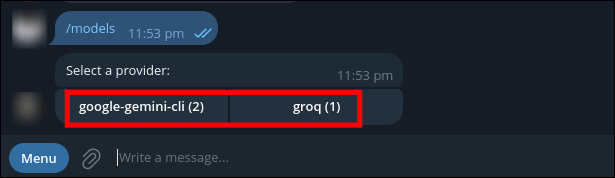
One task with Gemini, then back to the default classifier. I can override whenever I want. Simple.
The best part? If a model fails (timeout, rate limit, error), it automatically falls back. No manual intervention needed.
Security: Think Like You’re Running Foreign Code
Here’s a hard truth: running an AI agent on your network is running foreign code on your network.
It’s not malicious by default. But prompt injections are real and it’s not your code either. It has its own objectives (complete the task, satisfy the user), and those don’t always align with “don’t compromise my network.”
The Threat Model
An OpenClaw instance needs:
- Outbound internet access (to call Groq, Google Calendar, Telegram)
- Access to your task data (the Cloudflare Worker API)
- Permission to modify your calendar
- Ability to remember context
If someone compromises the agent, they could:
- Exfiltrate all your tasks
- Spam your calendar with fake events
- Use your API keys to call services on your behalf
- Pivot to other parts of your network
But here’s the thing: network isolation is important, but it’s not the only fix. Those API keys are exposed to whoever can chat with your agent. If someone gains access to Telegram, they have access to the agent. So network isolation helps, but it’s not enough.
The real fixes:
-
Network isolation (DMZ). Run it in a separate VLAN with strict firewall rules. It can reach the internet but not your internal network.
-
Explicit allowlisting. Only allow the agent to reach specific IPs/domains:
- Groq API endpoint
- Gemini API endpoint
- Cloudflare Worker
- Telegram API
- Google Calendar API
- Nothing else.
-
Secrets management. Don’t hardcode API keys. Use a proper secrets manager. Rotate credentials monthly.
-
Logging and Auditing. Log everything the agent does. Which model was used. What APIs were called. What the responses were. If something weird happens, you need to know.
-
Know what you’re exposing. Document which APIs, which data, which credentials the agent has access to. Be explicit about it. This is the most important one.
Here’s the thing: if you don’t know exactly what you’re giving an agent access to, you’ve already lost. You need to be paranoid about your blast radius. Here is an interesting read on privacy nightmares with OpenClaw.
My setup:
- DMZ VM, separate VLAN
- A fresh VM with nothing personal on it.
- Firewall rules only allow outbound to whitelisted IPs
- VPN tunnel for all traffic (WireGuard)
- API keys in a secrets manager, not in code
- All agent actions logged with timestamps and models used
- Monthly credential rotation
What I Actually Use It For
After tinkering on a weekend, here’s what I actually use:
Daily Task Review
Every morning at 8 AM, the agent fetches my tasks from Obsidian and sends a summary to Telegram:
🎯 Today's Tasks:
🔺 HIGH (2): Write blog on OpenClaw, Deploy Doc System
🔼 MEDIUM (3): Review meeting notes, Check infra logs, Admin
🔽 LOW (1): Organize photos

I've blocked calendar time for the high-priority items.
Takes 2 seconds. Cost: $0. Beats checking Obsidian manually every morning.
Calendar Blocking
High-priority tasks automatically create all-day blocks on Google Calendar. So when I open my calendar, I see:
9 AM - 10 AM: [BLOCKED] Write blog on OpenClaw
10 AM - 12 PM: [BLOCKED] Deploy Doc System
1 PM - 2 PM: Available
Game-changer. I can see at a glance what’s actually important today, not get buried under meetings.
Quick Reasoning
Sometimes I message the agent directly with a question:
Me: Is this CVE dangerous for our setup?
Agent: [Uses Gemini, reasons through it]
Agent: Not directly, because we have X in place and Y prevents the attack vector.
Takes 3 seconds. Cost: $0. Way faster than reading a GitHub issue for 30 minutes.
Overnight Processing
For long tasks (writing drafts, analyzing logs), this blog has been written by Minerva with suggestions sent time to time:
Me: Draft an outline for a blog on Openclaw
Agent: [Switches to Gemini, spends tokens reasoning]
Agent: [Sends result] Here's the outline...
Costs nothing on the free plan. Saves me 30 minutes of thinking time.
What Surprised Me
- Model switching actually matters. I thought it was over-engineering. It’s not. Groq handles 60% of tasks and is fast enough.
- Emoji metadata is sufficient. I expected to need YAML frontmatter or JSON. Turns out
🔺 • 📅 2025-02-06 • 🎯is perfectly parseable by both humans and models. - Obsidian as a database works. No schema migrations, no hidden state, everything is human-readable markdown. Simple beats clever every time.
- VPN + DMZ has zero latency impact. I worried about slowness. Imperceptible. Security doesn’t have to be slow.
What Still Breaks
- Timezone drift. Obsidian vault is in IST, Cloudflare Workers defaults to UTC, agent checks “today” from yet another timezone. I had to add explicit conversion logic.
- Duplicate detection. If I edit a task, sometimes it creates a duplicate instead of updating. Content hashing helps but isn’t perfect.
- Model response variance. Same task, different times—sometimes wildly different outputs. Had to add explicit formatting requirements in SKILL.md.
These are fixable. Not showstoppers, just the ongoing friction of running infrastructure.
Why I Spent a Weekend on This (When I Could’ve Just Used ChatGPT)
When I was failing terribly on that weekend, I asked myself: “Am I even going to use this?”
Honestly? Maybe not every day. But that’s not the point.
The point is: AI is reshaping how we work in real time. Every week there’s something new. Every week the capabilities shift. Either you adapt and play with this stuff, or you wake up in 2027 wondering why you’re obsolete.
I think spending time to understand:
- How agents work
- What they can and can’t do
- How to integrate them into my actual workflow
- How to route models cost-effectively
- How to keep data local while using cloud APIs
- How to run foreign code safely on my network
That isn’t a sunk cost—it was an investment in understanding where technology is headed. And honestly, it’s pretty exciting.
The fact that it cost me nothing and saved me time? That’s just the cherry on top.
Something that I found insanely interesting is this news, AI created two engines: LEAP 71 hot-fires two orbital-class methalox engines designed autonomously by Noyron
Post-Op Analysis
If you’re going to build something like this:
- Ollama is excellent for learning. If you want to understand inference, quantization, model optimization—run it. But for production personal use, free cloud models > self-hosted unless you have sensitive data.
- Model routing is worth the complexity. Groq for commodity tasks, Gemini for reasoning. You get reliability, cost savings, and better UX.
- SKILL.md is your agent’s constitution. Version it, test changes, iterate. It’s the most important thing you’ll write.
- Explicit about your blast radius. Network isolation helps, but logging and auditing matter more. Know what you’re exposing.
- Obsidian as a database works. Don’t overthink it. Markdown + simple sync is simpler than designing a schema. Source of truth is source of truth.
- Telegram is the best interface. Always on, notifications work, commands are natural.
- You don’t need to understand everything. I certainly don’t. But you should understand enough to know when something’s wrong and how to fix it.
What’s Next
I’m actively working on a few things:
- Ollama as fallback mode (future): If internet goes down, agent falls back to local Ollama. Slower, dumber, but functional. Currently experimenting.
- Anomaly Detection: I want to check how good it is in detecting anomalies in logs. Bruteforce attempts, username enumeration, SQLi?
- Multi-agent setup: Separate agents for work vs. personal vs. exploration.
- Audit logging: Every action logged with timestamps, model used, cost, reasoning. For transparency and debugging.
But the core is solid. I have an AI agent that:
- Runs on my infrastructure
- Integrates with my actual tools
- Costs nothing (so far)
- Respects my privacy
- Actually makes me more productive
That was the goal.
Closing Thought
The future of AI isn’t web interfaces and chat bubbles. It’s agents that integrate into your infrastructure, respect your privacy, and actually do work on your behalf. You oversee its progress. Human in the loop they call it.
OpenClaw is just the gateway. The real value comes from understanding your own workflow well enough to build an agent that fits into it.
So goal is to build something. Break it. Fix it. Iterate.
Disclaimer: I'm new to this. I'm tinkering on weekends and learning as I go. There are probably a hundred things I don't perfectly understand or am doing wrong. YMMV. If you try to build this and it explodes, that's on you. But hopefully something here helps.
References